You've built a solid LLM-powered feature, but the responses keep hallucinating details, citing outdated information, or completely missing the domain-specific nuance your users expect. The model isn't the problem; the magic is in the knowledge source, not just the model.
Here's what most teams miss: they already have a high-quality, domain-specific, frequently updated knowledge source sitting right under their nose: their blog.
Key Takeaways
For LLM-powered features, Retrieval-Augmented Generation (RAG) is often superior to fine-tuning because it's cheaper, more accurate, and uses up-to-date information.
Your company blog is a perfect, pre-existing knowledge base for RAG systems since its content is already domain-specific, structured, and regularly updated.
The key to a successful RAG pipeline is clean data ingestion: programmatically fetching, chunking, and indexing content with its metadata.
A headless CMS like Wisp dramatically simplifies this process with a Content API that delivers structured JSON, ready to be fed into a vector database.
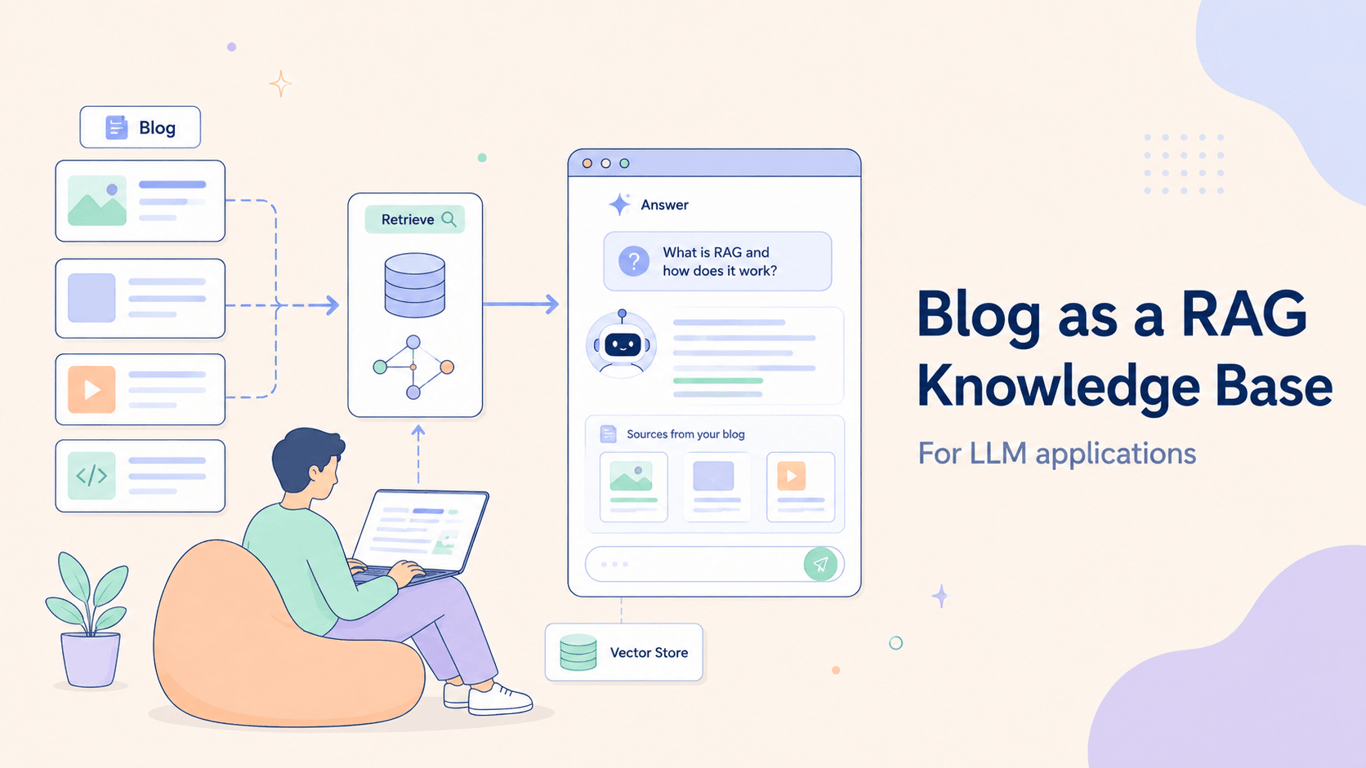
This tutorial walks through how to use your blog as a Retrieval-Augmented Generation (RAG) knowledge base, and specifically how Wisp's Content API makes the data ingestion side of that dramatically cleaner.
What Is RAG and Why It Beats Fine-Tuning
Retrieval-Augmented Generation (RAG) is the process of optimizing a large language model's output by referencing an external knowledge base outside its training data, as AWS describes it. Instead of baking domain knowledge into the model weights through fine-tuning, you retrieve relevant context at query time and inject it into the prompt.
For most use cases, RAG wins on every practical dimension:
Cost: Fine-tuning a foundation model on proprietary data is expensive and must be repeated every time the data changes. RAG lets you update the knowledge base independently.
Currency: Your indexed content stays current. When you publish a new post, it can be indexed and queryable within minutes, not after the next training run.
Accuracy: Grounding the LLM in specific source documents reduces hallucinations. You can even surface citations back to the original post, which builds user trust.
Control: You own the knowledge base. You can add, remove, or update content without touching the model.
Why a Blog Is a Natural RAG Knowledge Base
Most RAG challenges come down to data quality. As one developer put it in a RAG-focused discussion on Reddit, "your embeddings, reranking etc are all meaningless if you're indexing and ingesting in a subpar fashion." A blog gives you control over that content by default.
Blog content is domain-specific by design. Your posts are already written for your audience, about your product or industry, in your company's voice. There's no knowledge bleed from trying to consolidate unrelated domains into one giant knowledge base, a trap that consistently trips up developers building RAG systems at scale.
Blog posts are also structurally clean. They have titles, headings, paragraphs, and tags. That hierarchy makes programmatic parsing far more straightforward than scraping PDFs, Confluence wikis, or shared Google Docs. Rich metadata (publish date, author, tags, category) comes along for the ride, enabling the kind of metadata filtering at the vector database (vector DB) level that keeps query results accurate and scoped.
And unlike a static internal document, a blog is a living knowledge source. New tutorials, product updates, and feature announcements get published regularly, giving your RAG system a steady stream of fresh, high-quality input.
Why Wisp Works Well for This Workflow
The hardest part of building a RAG knowledge base is usually figuring out "how to structure the discovery and extraction process," as developers frequently note. Wisp removes most of that friction.
Wisp's Content API returns clean, structured JSON for every post. You're not scraping HTML from a public URL or parsing a WordPress export file. The response ships with the content body alongside metadata: tags, publication date, slug, and author. Tag every chunk with that metadata when you index it, and you've got the foundation for precise filtering and routing in your vector DB without extra preprocessing work.
Pagination is built in, so fetching your entire post archive in a loop is a few lines of code. And because Wisp is a headless CMS built specifically for blogs on Next.js and React, it's designed from the ground up for programmatic content delivery. Plugging it into a data pipeline is the intended use case, not an afterthought.
Step-by-Step: Building a Blog-Powered RAG System
Here's how to wire your Wisp-powered blog into a working RAG knowledge base.
Step 1: Fetch All Posts from the Wisp Content API
Install the @wisp-cms/client JavaScript SDK (JS SDK) and pull your post archive. The SDK handles authentication and pagination cleanly.
import { createClient } from '@wisp-cms/client';

const wisp = createClient({ blogId: 'YOUR_BLOG_ID' });

async function fetchAllPosts() {
  const allPosts = await wisp.getPosts();
  return allPosts;
}
The response shape you'll get back looks like this:
{
  "data": [
    {
      "id": "post_123",
      "title": "How to Optimize Next.js Performance",
      "slug": "optimize-nextjs-performance",
      "htmlContent": "<p>Start by analyzing your bundle size...</p>",
      "tags": ["Next.js", "Performance"],
      "publishedAt": "2024-10-27T10:00:00Z"
    }
  ]
}
Every post comes with htmlContent, tags, and a publish date. Hold onto that metadata. You'll attach it to your vector embeddings in a later step.
Step 2: Chunk Content into Embedding-Friendly Segments
Embedding an entire blog post as one unit produces poor retrieval results. The embedding captures an average representation of the whole post, which makes it hard to surface the specific paragraph that actually answers a user's question. Smaller, coherent chunks produce sharper semantic matches.
A simple approach: split on paragraph tags. A more sophisticated one splits on headings (<h2>, <h3>), keeping semantic sections intact.
function chunkContent(htmlContent, postId) {
  const paragraphs = htmlContent.split('</p>');
  return paragraphs
    .map((p, index) => ({
      postId: postId,
      chunkIndex: index,
      text: p.replace(/<[^>]+>/g, '').trim(),
    }))
    .filter(chunk => chunk.text.length > 50);
}
Tag every chunk with metadata: postId, slug, tags, publishedAt. As one developer put it, this single step "saves you from chaos down the line" when you need to filter or route queries.
Step 3: Generate Embeddings
OpenAI's text-embedding-3-small is a solid default. It's fast, cheap, and sits at 1536 dimensions, which is manageable for most vector DBs.
import OpenAI from 'openai';

const openai = new OpenAI({ apiKey: process.env.OPENAI_API_KEY });

async function getEmbedding(text) {
  const response = await openai.embeddings.create({
    model: 'text-embedding-3-small',
    input: text,
  });
  return response.data[0].embedding;
}
Run this over every chunk you produced in Step 2.
Step 4: Store in a Vector Database
Two strong options here: Pinecone and Qdrant.
Pinecone: A fully managed SaaS vector DB. Zero infrastructure to maintain, fast to spin up, and well-documented. Good fit if you want to ship quickly and skip ops work.
Qdrant: An open-source option with cloud, on-premise, and local deployment options. It gives technically inclined teams more control and flexibility. Benchmarks from Particula.tech show Qdrant achieving roughly 2x lower latency (22ms vs. 45ms) in some configurations, and its advanced filtering support maps well to the metadata-heavy chunks you're creating.
Here's the indexing step using Pinecone:
import { Pinecone } from '@pinecone-database/pinecone';

const pinecone = new Pinecone({ apiKey: 'YOUR_PINECONE_API_KEY' });
const index = pinecone.index('wisp-blog-kb');

async function storeEmbedding(chunk, embedding) {
  await index.upsert([{
    id: `${chunk.postId}-${chunk.chunkIndex}`,
    values: embedding,
    metadata: {
      postId: chunk.postId,
      text: chunk.text,
      tags: chunk.tags,
      publishedAt: chunk.publishedAt,
    },
  }]);
}
Step 5: Retrieve Context and Generate a Response
When a user asks a question, embed it using the same model from Step 3, query the vector DB for the top-k nearest chunks, and pass those chunks as context to your chat model.
A prompt template that works well:
You are a helpful assistant for [Your Company]. Answer the user's question
based only on the context below. If the context doesn't contain the answer,
say you don't have enough information.

Context:
---
[Retrieved Chunk 1]
---
[Retrieved Chunk 2]
---

User Question: [Question]

Answer:
This grounding approach keeps the model from hallucinating outside of what your blog actually covers.
Step 6: Expose It via an API Route
Wrap Steps 3 and 5 in a Next.js API route or serverless function. Your frontend sends the user's question, the route returns an answer derived from your blog content. That's enough to power a chatbot widget, an AI site search bar, or an internal knowledge assistant.
What You Can Build With This
Once the pipeline is running, a few high-value applications become straightforward:
Customer support bot. Train it on your help docs and tutorials. It answers common questions 24/7 without routing to your support queue.
Internal knowledge assistant. Point it at posts covering your product roadmap, processes, or technical decisions. New teammates can ask questions instead of hunting through archives.
AI-powered site search. Instead of a list of matching links, users get a direct answer with a source citation.
Keeping Your Knowledge Base in Sync
A RAG system is only as useful as its knowledge base is current. Two approaches work well here:
Webhooks (recommended): Configure Wisp to fire a webhook whenever a post is published or updated. Your indexing function catches the event, re-chunks that post, generates fresh embeddings, and upserts to the vector DB. The knowledge base stays in near real-time sync with your editorial calendar.
Cron job (reliable fallback): Schedule a daily job that fetches recent posts from the Content API, compares against what's already indexed, and re-indexes anything new or modified. Less immediate than webhooks, but simple to operate and easy to reason about.
Either way, the update loop is clean because Wisp returns publish and update timestamps with every post. You always know exactly what's changed.
Turn Your Blog Into Your Best AI Asset
The secret to a smarter, more accurate LLM feature isn’t a better model: it’s better data. Your company blog is the perfect source, packed with domain-specific knowledge you already own. Success comes down to using your blog as a clean, structured knowledge base and having a friction-free way to get that content into your pipeline.
If your current CMS makes fetching posts feel like a chore, a headless platform with a clean Content API can remove that friction. Wisp's free plan includes full API access, so you can explore the docs and see if it’s a fit for your RAG pipeline.
FAQs
What is RAG and why is it better than fine-tuning?
Retrieval-Augmented Generation (RAG) is better than fine-tuning because it grounds LLM answers in real-time, external data. This makes it cheaper to update, more accurate by reducing hallucinations, and ensures your information is always current without retraining the model.
Why use a blog as a RAG knowledge base?
You should use your blog as a RAG knowledge base because its content is already domain-specific, structured, and regularly updated. This provides a high-quality, controlled data source that is much cleaner than scraping wikis or internal documents for your AI features.
How does a headless CMS simplify a RAG pipeline?
A headless CMS simplifies RAG by providing a Content API that delivers clean, structured JSON. This eliminates messy web scraping and gives you programmatic access to posts and metadata, making the data ingestion and chunking process far more reliable and efficient.
What is the most critical step in a RAG system?
The most critical step for a successful RAG system is clean data ingestion. The quality of your retrieval depends entirely on how well you fetch, chunk, and index your source content with its metadata. Poor data quality leads to irrelevant search results and inaccurate answers.
How do I keep a RAG knowledge base up-to-date?
You can keep your RAG knowledge base updated automatically using webhooks or a cron job. A webhook can trigger your indexing process whenever a post is published or updated, ensuring near real-time sync. A scheduled cron job provides a reliable daily fallback.
Can I use my blog for RAG without a headless CMS?
Yes, you can still use your blog for RAG, but data ingestion will be harder. You may need to scrape HTML from your site or parse XML exports, which is often more brittle and requires more preprocessing to get clean, structured content for indexing.
What is the best way to chunk posts for a RAG system?
The best way to chunk blog posts for RAG is to split them into semantically related segments. While splitting by paragraph is a simple start, splitting by headings (H2, H3) often yields better results by keeping coherent sections of text and their context together.