Key Takeaways
- While Medium offers a great writing experience, it lacks the search, analytics, and content management tools needed for a professional developer blog.
- Choosing the right alternative depends on your primary goal: use community platforms like Hashnode for audience, Ghost for monetization, or static site generators for full technical control.
- For teams on modern stacks like Next.js, a headless CMS architecture prevents developer-writer bottlenecks by separating the content editor from the frontend.
- A blog-first headless CMS like Wisp provides a Medium-like editor for writers and a simple SDK for developers, combining the best of both worlds for content-driven teams.
Medium's minimalism, speed, and editor are genuinely good. It's a joy to write on. But if you've been using it for any length of time, you've likely hit the wall: no search, no bulk editing, and stats that barely tell you anything.
For developer blogs that need to function as a core business asset, Medium is rented land. You're subject to their algorithm, their branding, and their feature roadmap. This list evaluates the best Medium alternatives for developers, ranked on developer experience, editorial workflow, SEO control, and long-term scalability.
Here's how these tools stack up for teams building on modern web stacks.
The Best Medium Alternatives for Developer Blogs
Each platform below solves a different slice of the problem. The right pick depends on how much control you need, who's writing, and what stack you're building on.
1. Wisp
Wisp is a headless blog Content Management System (CMS) built specifically for Next.js and React. It pairs the clean writing experience of Medium with the infrastructure control that developers actually need from a production blog.
Best for: Founders, developer advocates, and agencies running content-driven sites on a modern frontend stack.
Pricing: Free plan available; Pro starts at $16/user/month.
Why Wisp Leads This ListThe biggest problem with Medium for serious content teams isn't the UI. It's the lack of editorial autonomy paired with zero developer access. Wisp fixes both sides of that equation at once.
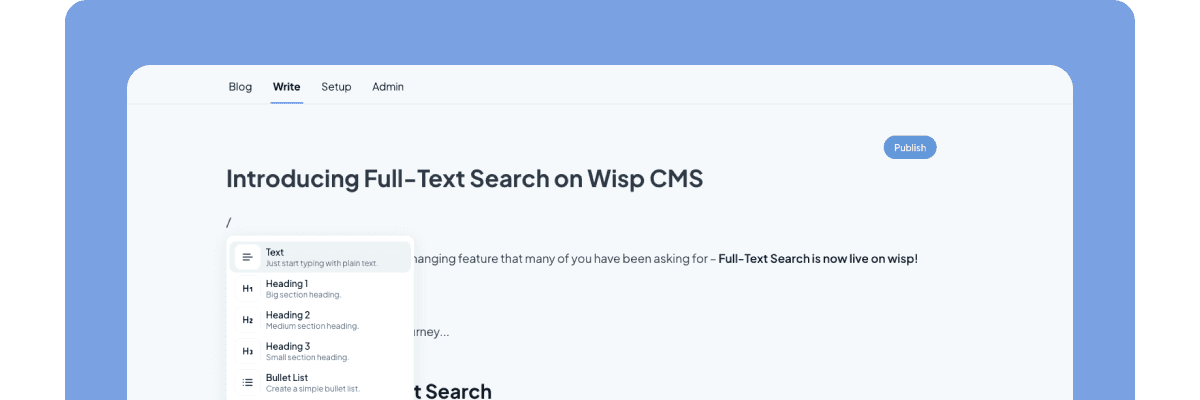
Writers get a polished, Medium-inspired editor that requires no Markdown knowledge and no pull requests to publish. Developers get a typed JavaScript Software Development Kit (SDK) (@wisp-cms/client), a clean Content API, and a Next.js Starter Kit that cuts setup time to minutes rather than days.
A few capabilities here don't exist elsewhere in this category. First, Custom React Components: developers register interactive components via the @wisp-cms/react-custom-component SDK, and writers can insert them into any post via a slash command. They render on the live frontend, not in the editor preview. This means you can embed live demos, data visualizations, or custom lead-capture forms directly in blog posts, something Medium and most alternatives simply can't do.
Second, Wisp includes AI-powered contextual CTAs matched to article content via embeddings, and semantic related post suggestions to keep readers moving through your library. These are built in, not third-party plugins bolted on.
Third, multi-tenancy support lets agencies and freelancers manage multiple client blogs from a single account, a workflow that falls apart completely on Medium.
Content and media are delivered via a global Content Delivery Network (CDN), so fast load times are a realistic outcome without any manual CDN configuration. Wisp also includes a built-in commenting system with moderation, nested replies, and email verification.
2. Ghost
Ghost is an open-source publishing platform built around clean content creation and direct audience monetization. Its editor is focused and distraction-free, and it has strong built-in support for paid memberships, and subscriptions.
Best for: Creators and publications focused on building a direct paid audience rather than a technical content hub.
Pricing: Ghost(Pro) starts at $9/month; self-hosting is free but requires a server.
Ghost is the closest content-focused peer to Wisp, and it's worth taking seriously. The membership and newsletter tooling is genuinely impressive and built natively into the platform.
That said, Ghost is opinionated about its frontend. Building a fully custom Next.js site on top of Ghost is possible via its Content API, but the platform's value proposition is tightly coupled to its theme ecosystem. Developers who want to bring their own frontend without fighting the platform's assumptions will find Wisp's headless-first approach less friction-heavy. Ghost also lacks multi-tenancy for agencies and doesn't support embedding custom React components into posts.
3. Hashnode and Dev.to
Hashnode and Dev.to are developer-focused community platforms designed for audience building and content syndication, not for hosting the canonical version of a production blog.
Best for: Individual developers building a personal brand, getting peer feedback, and reaching a built-in audience of other developers.
Both platforms are free, require no setup, and come with an existing engaged audience for technical content. As noted in a 2024 overview of Medium alternatives, Hashnode adds the ability to map a custom domain, which gives it a slight SEO edge over Dev.to for personal branding.
The trade-off is fundamental: these are audience platforms, not infrastructure choices. You don't own the platform, you're limited to their feature set, and building long-term SEO equity on someone else's domain is a fragile strategy. They're excellent for syndicating content and driving awareness, but they're a poor choice for a company's primary developer blog where content is a business asset.
4. Self-Hosted WordPress
WordPress remains the default that many teams either move toward or run away from. Self-hosted WordPress.org gives you complete control over design, functionality, and data, backed by an unmatched plugin ecosystem.
Best for: Teams comfortable with hosting, security patching, and performance tuning who want access to a vast plugin library.
The breadth of what you can do with WordPress is genuinely impressive. For developer blogs, it's a workable choice — particularly for teams that already have WordPress expertise in-house.
The friction is real, though. Plugin sprawl, constant security updates, and a development workflow that doesn't integrate cleanly with Git are legitimate pain points for teams on modern stacks. A headless WordPress setup is possible, but it adds complexity without eliminating the maintenance overhead. As Draft.dev's overview notes, WordPress delivers strong SEO control but requires meaningful infrastructure planning. For teams who want a fast, low-maintenance blog on Next.js, that overhead is often the reason they look elsewhere.
5. Static Site Generators with Local Markdown
The purist's approach: tools like Hugo, Jekyll, and Gatsby give you blazing-fast static output, Git-native workflows, and zero database to maintain.
Best for: Solo developers or small, highly technical teams who want content living in the repository alongside code.
Performance and security are the genuine strengths here. There's no CMS attack surface, no plugin vulnerabilities, and the static output loads fast everywhere. As noted by Draft.dev, Hugo in particular is known for minimal complexity and rapid build times.
The ceiling hits fast when the team grows. Every post edit, image upload, or typo fix requires a pull request. Non-technical contributors are effectively locked out. This creates the exact developer bottleneck that a CMS is supposed to solve, and it's the opposite of the accessible experience that made Medium appealing in the first place.
Why Developer Blogs Outgrow Medium
Medium's appeal is real. The editor is clean, publishing is instant, and the UI stays out of the way. For early-stage writing or personal essays, it's hard to beat. But a developer blog that drives SEO, captures leads, and serves a growing content library has different requirements.
The problems that surface are consistent. As one developer put it in this Reddit thread, "if you have hundreds of posts... just not viable." Users describe a platform that looks professional but lacks the basic tools any serious content marketer would expect.
The specific pain points cluster around three areas:
- Content discoverability. There's no way to search your own posts. With a large library, the only option is scrolling and using Ctrl + F in the browser, a workflow that doesn't scale past a few dozen articles.
- Content management. No bulk editing, no batch edit functionality, and no meaningful categorization beyond basic tags. Restructuring a content library means touching every post individually.
- Analytics. The stats are too limited for data-driven content strategy. There's no way to see historical view counts since account creation, and integration with tools like Google Analytics 4 requires sending readers off-platform.
Beyond usability, there's a more fundamental issue: Medium is rented land. Your content lives on their domain, which means SEO equity accrues to Medium, not your site. As Draft.dev points out, Medium works well for content syndication, but it's not a viable primary hosting platform for a developer blog that needs to build compounding organic traffic.
When a Headless CMS Makes Sense
A headless CMS separates the content management layer from the frontend presentation layer. Content is stored and edited in the CMS, then delivered to your site via an API. Your frontend, built in Next.js, React, or whatever stack you prefer, calls that API and renders content however it needs to.
This architecture has real advantages for developer blogs. The frontend isn't coupled to the CMS vendor's opinions about templates or themes. You can optimize rendering strategy independently: static generation for speed, server rendering for personalization, incremental regeneration for large archives. Content updates don't require deployments.
For content teams, the benefit is editorial autonomy. Writers publish through a dedicated editor without opening a code editor, learning Markdown, or filing a pull request. The developer workflow and the editorial workflow stop blocking each other.
General-purpose headless CMS tools like Contentful and Sanity are powerful, but they're built for complex content modeling across multiple content types. For a developer blog, that power comes with configuration overhead. You're building a bespoke blog setup on top of a general-purpose platform. As Sanity's own overview of headless CMS describes, the flexibility is the point, but that flexibility has to be configured by someone.
A blog-first headless CMS like Wisp skips that configuration layer. The assumptions are already made: posts, tags, authors, related content, commenting. You're not building blog infrastructure; you're writing blog posts.
How to Choose the Right Medium Alternative
The right platform depends on what you're optimizing for. Here's a quick framework:
- You want a built-in audience and community feedback. Hashnode or Dev.to. Use them for syndication; don't build your canonical blog there.
- You want monetization through newsletters and memberships. Ghost. Accept that you're adopting its ecosystem.
- You want maximum plugin flexibility and can handle the maintenance. Self-hosted WordPress. Budget time for updates and performance work.
- You want content in Git and your team is entirely technical. A static site generator. Accept that non-technical contributors will need developer help.
- You want a fast, modern developer blog where writers don't block on developers. A blog-first headless CMS. Wisp is built for exactly this.
The deciding factor for most developer blogs is the editorial workflow question: who needs to publish, and how much friction can you accept? If your writers need to open a repository to fix a typo, that friction compounds quickly. If your developers are rebuilding blog infrastructure every time a new content type is needed, that's time not spent on core product work.
A well-chosen Medium alternative removes both sources of friction at once.
Quick Comparison: Medium Alternatives at a Glance
| Platform | Developer Control | Editorial Autonomy | Best For |
|---|---|---|---|
| Wisp | High (API + JS SDK) | High (no-code editor) | Next.js and React developer blogs |
| Ghost | Medium (themed frontend) | High | Newsletters and paid communities |
| Hashnode / Dev.to | Low (platform-owned) | High | Personal brand and syndication |
| WordPress (self-hosted) | High (plugins) | Medium | Plugin-heavy setups |
| Static Site Generators | Highest (full code) | Low | Solo technical teams |
Your Blog Should Be an Asset, Not a Bottleneck
Medium is a great place to write, but for a blog to become a true business asset, you need control over SEO, analytics, and your content library. The best alternative depends on your biggest bottleneck: static site generators give developers full control but often lock out writers, while community platforms offer an audience but no real ownership.
Wisp is built to remove that exact bottleneck for teams on modern stacks, giving writers a Medium-like editor and developers a simple SDK. The free plan includes unlimited blogs and posts, so it's worth trying if your current setup is slowing you down. You can get started for free without a credit card.
FAQs
Why should I move my developer blog off Medium?
You should move your developer blog off Medium to gain control over SEO, content management, and analytics. Medium limits your ability to build a long-term business asset on your own domain.
What is the best free Medium alternative for developers?
The best free Medium alternative depends on your goal. Hashnode is great for reaching a built-in audience, while self-hosting Ghost or using a static site generator gives you full control at the cost of your own server maintenance.
How does a headless CMS help with a developer blog?
A headless CMS helps by separating your content editor from your frontend code. This allows writers to publish content freely without needing developer help or pull requests, removing a major bottleneck for content-driven teams.
What's the main difference between Wisp and Ghost?
The main difference between Wisp and Ghost is their architecture. Wisp is a headless-first CMS designed for custom frontends like Next.js, while Ghost is a monolithic platform tightly coupled to its own theme ecosystem.
Is it okay to use Hashnode or Dev.to as my main blog?
Using Hashnode or Dev.to as your main blog is not recommended for building a business asset. These platforms are best for content syndication and audience building, as you don't own the platform or the full SEO equity.
When should I choose a static site generator over a headless CMS?
You should choose a static site generator over a headless CMS when your entire team is technical and comfortable with a Git-based workflow. A headless CMS is better when non-technical writers need to publish content independently.